Request Notifications: What You're Alerted to and Why
Last updated: September 16, 2026
All
Request notifications are triggered by specific events: mentions in notes, assignments, escalations, replies from requesters, and SLA status changes. Depending on the notification type and your workspace configuration, they arrive either directly in the Kin Slack app (this is the default in MS Teams) or in a configured Slack channel.
A few notifications reference "claiming" a request. When a request escalates to a team (rather than a specific default assignee on the escalation path), every member of that team becomes eligible to pick it up — a claimer. Whoever acts on it first claims the request and becomes its assignee. (This is the same mechanism described in the Service Desk settings article: when a team has no default escalation user, members see the request when they log in and can pick it up themselves.)
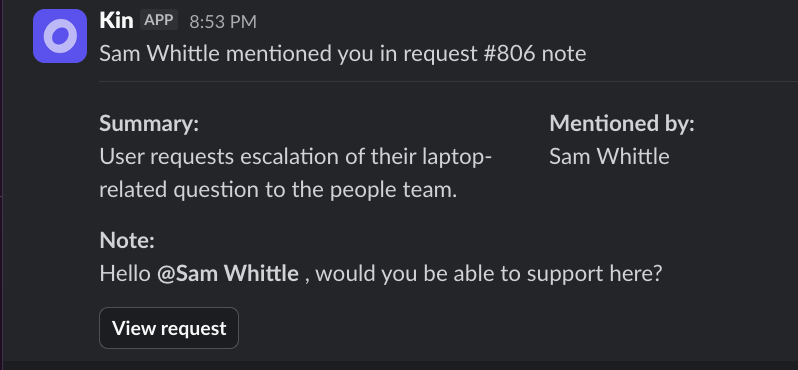
Mentions
When sent: A note is added and includes one or more mentions.
Who receives it: Mentioned individuals and/or teams
How: To the Kin Slack app (not a channel)
New note added
When sent: A new note is added to a request.
Who receives it: Followers, except:
people already mentioned in that note,
the person who wrote the note,
and (for non-manual requests) the original requester.
A refresh on when someone is 'Following' here
Agent request assigned
“You were assigned to request”
When sent: The request is assigned to a person by another person.
Who receives it: The assignee.
Not sent when: The request is already closed.
Delivery mode: Kin Slack App
Request reopened
When sent: A previously escalated request is reopened.
Who receives it: The assignee (if there is one).
Special case: If the reopened request has no assignee, the system starts the "claim expected" flow instead.
Delivery mode: Kin Slack app
Escalated Request
When sent: A request is escalated
Who receives it: Teams or individuals listed in the escalation rules for the category
Delivery mode: Either Slack channel or direct in the Slack app, depending on the configuration
Agent request claimed
When sent: Someone claims (is assigned to) a request that had claimers.
Who receives it: Other claimers (not the person who claimed it), through both team and direct routes.
Update behaviour: May update an existing message in place, or send a new one (details in timing section below).
New user reply for request (if toggled on 'New agent conversation reply notifications')
When sent: There's a reply from the requester
Who receives it: Current assignee.
Not sent when: Not subscribed
How claim notifications update over time
Claim expected -> claimed in-place update window (~1 hour)
The system stores message references for claim-related notifications for about 1 hour.
If a request is claimed within that window, and org setting allows updates, the existing "claim expected" message can be updated in place to "claimed".
If the request is claimed after that window (or update setting is disabled), the system sends a new claimed message.
If claimed with button in slack, claim message is updated in-place anyway (to show that button did work), but new message is also sent.
In simple terms:
Within ~1 hour: update existing message.
After ~1 hour: send a new message.
SLA notifications
What triggers SLA notifications
SLA status is refreshed when key request events happen, including:
priority changes,
escalation,
first human response,
close / reopen,
SLA pause/resume (while waiting for answer from requester)
“At risk” and “Breached” time hit
If one or more SLA clocks change to a notifiable state, the system sends an "SLA status changed" notification.
Who receives SLA notifications
If the request is assigned: notification goes to the assignee.
If unassigned: notification goes to claimers (direct claimers + members of claimer teams).
What the SLA notification contains:
request ID / sequential ID,
request summary,
SLA details (type, current status, start time, and breach time).
Important SLA notes
Archived requests do not generate SLA notifications.
SLA scheduling and refresh are automatic; future SLA refresh jobs are created when needed.
4. Delivery destination behaviour for team-based notifications
When recipients come from teams, delivery follows team settings:
Slack channel destination: one message to the configured channel.
Direct-message destination: one message per team member.
Priority mute support: team-level muted priorities can suppress team notifications.