Rippling integration
Last updated: September 21, 2026
Connect your Rippling HRIS to Kinfolk to sync employee data and enable real-time updates.
What you'll need
Admin access to Rippling
A Rippling API key (see Rippling's guide on generating an API key)
Access to Rippling Workflow Studio with the "Call a public API" step enabled (contact your Rippling account manager if this isn't available)
Step 1: Connect your Rippling account
Go to Settings → Integrations in Kinfolk, or use the link provided by your Kinfolk contact
Click Connect HR Systems and select Rippling
Enter your Rippling API key when prompted
Save the Native Webhook URL displayed during setup. You'll need this for the next step.
Step 2: Configure webhooks
To enable real-time data sync, you need to create three workflows in Rippling that notify Kinfolk when employees are created, updated, or deleted.
Reference: Rippling's guide to workflow and webhooks
Workflow 1: Employee Created
Trigger configuration:
Workflow trigger: "Relative to someone's start date"
Start the workflow X days before this day (recommended: 7 or 30 days, depending on when you want new hires to sync)
Action configuration:
Step: "Call a public API"
Name:
Employee CreatedURL: Your Native Webhook URL
Payload (paste under "Advanced"):
{ "event": "employee.created", "work_email": "<Employee work email variable>" }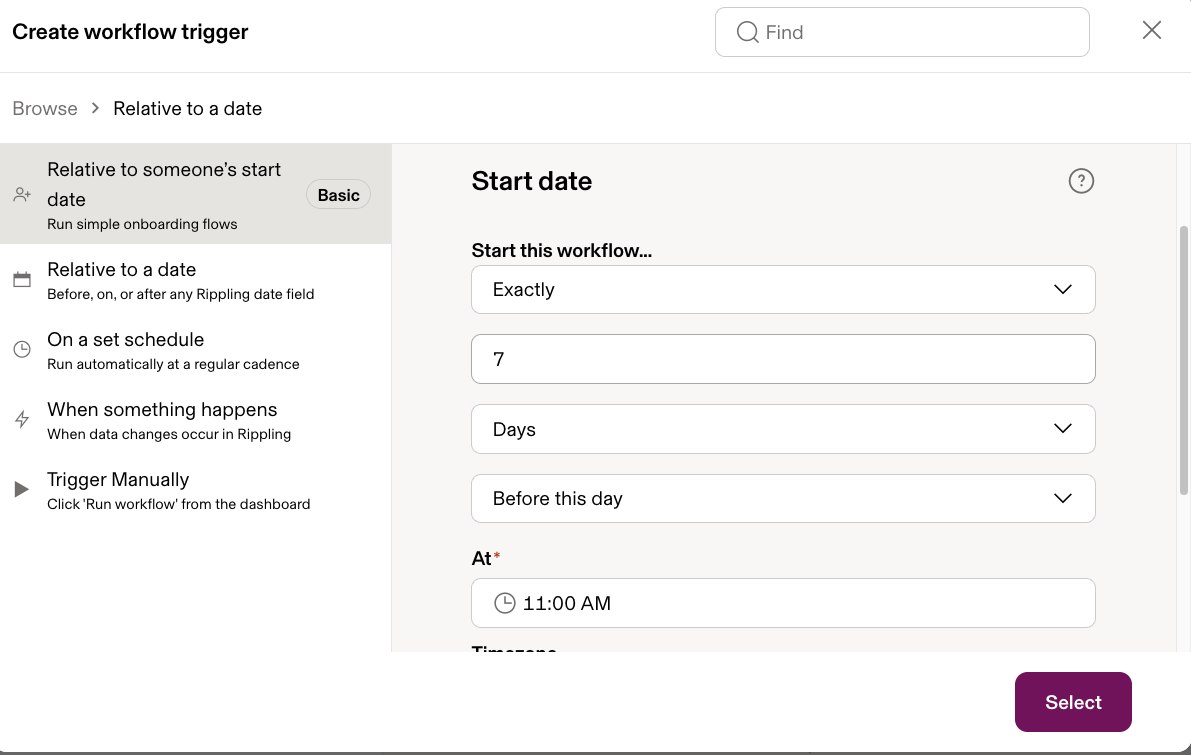
Workflow 2: Employee Deleted
Trigger configuration:
Workflow trigger: "When something happens" > "HR Management" > "Termination approved or finalized"
Action configuration:
Step: "Call a public API"
Name:
Employee DeletedURL: Your Native Webhook URL
Payload (paste under "Advanced"):
{ "event": "employee.deleted", "work_email": "<Employee work email variable>" }Workflow 3: Employee Updated
Trigger configuration:
Workflow trigger: "When something happens" > "Object creation and updates" > Employee "is updated"
Action configuration:
Step: "Call a public API"
Name:
Employee UpdatedURL: Your Native Webhook URL
Payload (paste under "Advanced"):
{ "event": "employee.updated", "work_email": "<Employee work email variable>" }Need help?
If you run into any issues, reach out to your Kinfolk contact or email support@kinfolkhq.com.