Analytics
Last updated: July 8, 2026
All (however visibility will differ)
Kin’s reporting dashboard provides visibility into how employees are interacting with Kin, how effectively requests are being handled by the AI and members, identify opportunities to improve knowledge or automation and more.
The dashboard contains two primary views:
Team Activity – operational metrics about requests and support performance
Trends – analytics on usage, deflection, and satisfaction over time
Team Activity
The Team Activity dashboard provides a real-time view of incoming requests and team performance.
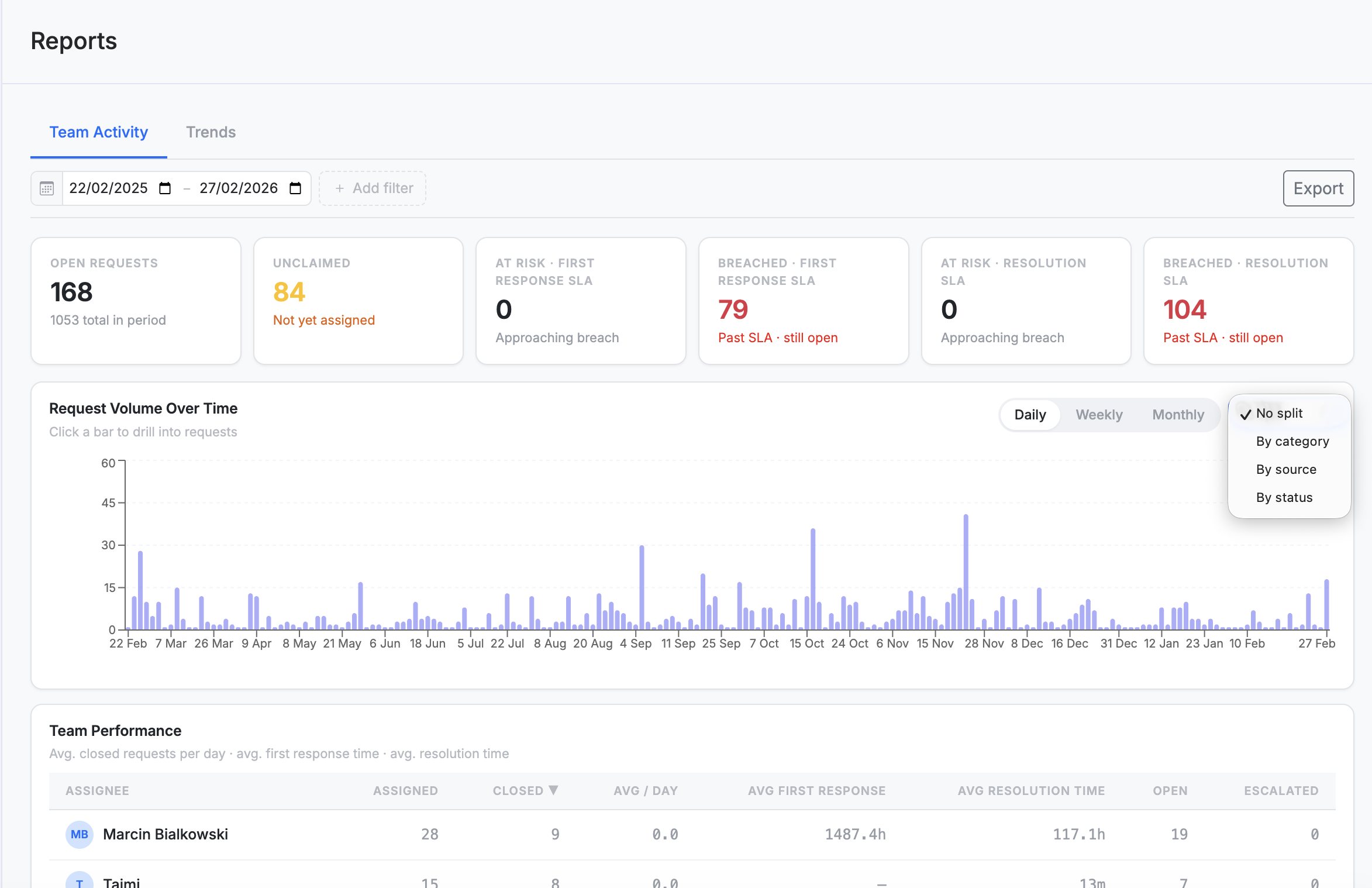
Key Metrics
Open Requests
The number of conversations that are currently unresolved.
Unclaimed
Requests that have not yet been assigned to a team member.
SLA Indicators
At Risk – First Response SLA – requests approaching their response deadline
Breached – First Response SLA – requests that missed the first response SLA
At Risk – Resolution SLA – requests close to breaching resolution time
Breached – Resolution SLA – requests that exceeded the resolution SLA
These indicators help teams quickly identify requests that require immediate attention.
Request Volume Over Time
The Request Volume Over Time chart shows how many requests are received within a selected time period.
You can:
View request volume daily, weekly, or monthly
Split results by category, source (Slack, internal, email) or status (automated, escalated, closed)
Click a bar to drill down into the requests for that time period
This helps teams understand support demand patterns and operational workload.
Team Performance
The Team Performance table provides insights into how individual team members are handling requests.
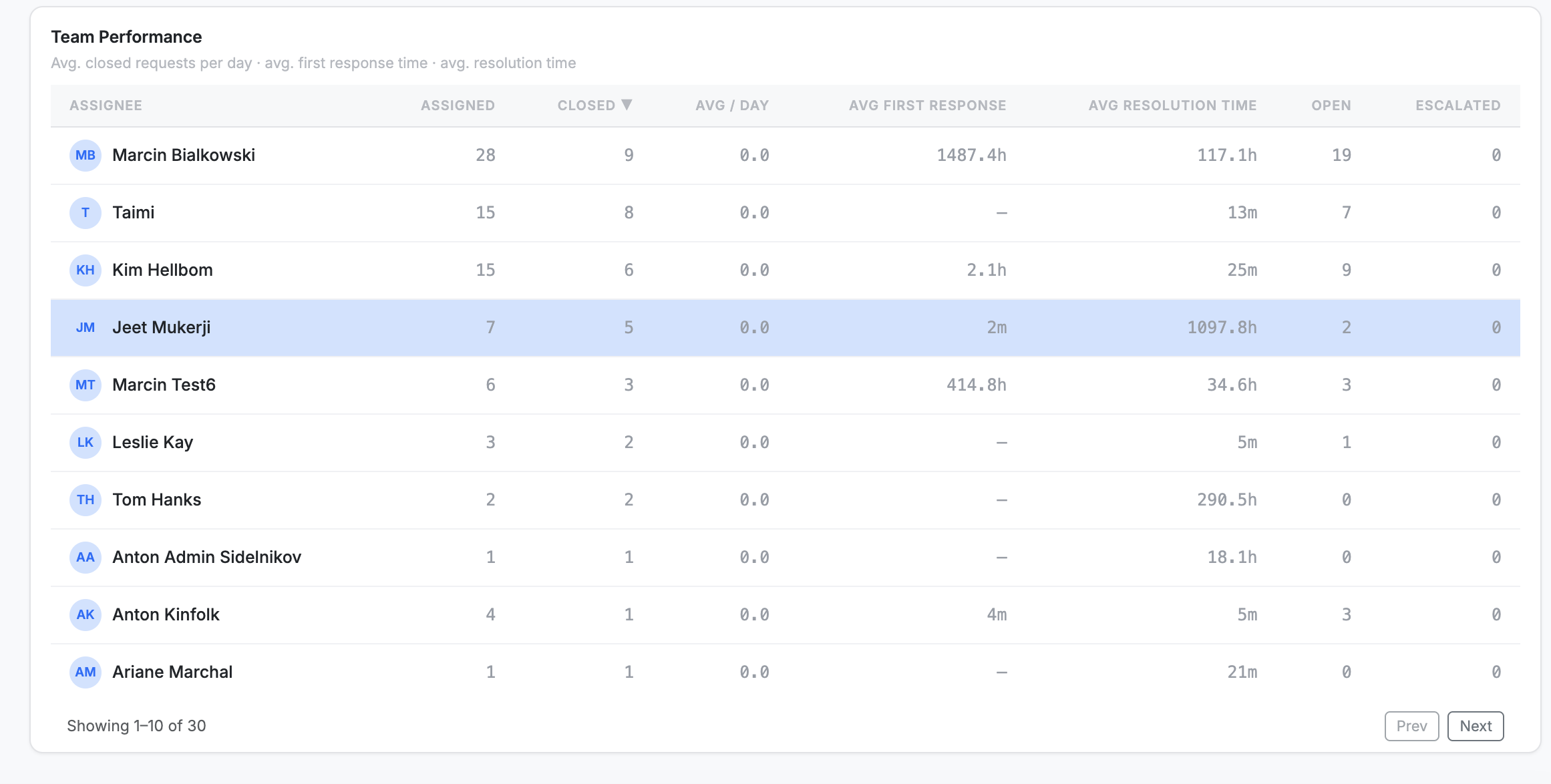
This allows managers to track workload distribution and response efficiency across the team.
Trends Dashboard
Focuses on usage analytics and AI performance over time.

Key Metrics
Total Conversations
The total number of conversations employees have started with Kin.
This includes requests initiated through:
Slack messages
Channel interactions
Other supported sources
Active Users
The number of unique employees who submitted requests during the selected time period.
Deflection Rate
The percentage of requests that Kin resolved without escalation to a human team member (Slack only, as can't deflect internally raised requests or email)
Median CSAT Score
The median satisfaction score submitted by employees after a request is resolved.
Positive Feedback
The proportion of requests that received positive satisfaction ratings.
Request Sources
The dashboard also shows where requests originate from, such as:
Slack
Email
Internal submissions
Manual entries
Exporting Reports
You can export reporting data directly from the dashboard.
Exports include:
Request metadata
SLA performance metrics
CSAT scores and feedback
Request sources and categories
Exports are delivered as CSV files packaged in a ZIP file, making them easy to analyse in external tools. Any PII is removed, and the conversation thread is removed.
This export is raw data. To help interpret it, bear in mind the following;
escalated_at is the timestamp for when the request was escalated to a human. If this is blank, then the request was never escalated.
done_atis the timestamp for when the request was first closed.flagStatusis set toAUTO_CLOSEDwhen the request was closed by the agent itself because the user left the conversation hanging.